Self Serve Patient Education for Specialty Practices

Hoot Health · For specialty practices

Self serve Patient Education journey by text and video, set up for your practice.

Hoot helps specialty practices get patients prepared, booked and through their procedure with short provider videos and one tap replies, delivered as an RCS text thread. Your staff answer fewer of the same questions.

QR code to try the demo journey
Try it now
Scan to get the journey on your phone
See the journey
Book a demo
See Hoot set up for your practice
✓No app✓No portal✓No login✓Works on any phone
9:41
P
Your Practice Patient Care✓
Verified business
Today 8:15 PM
Hi Maria, this is Your Practice Patient Care, on behalf of your care team. Start here:
Getting Ready for Your Knee Replacement · 1:00
Watch Video
1. Preparing for surgery
2. Recovery and pain
3. Cost and insurance
+
RCS message
Watch time
0:47 of 0:50
Patient replied
“I’m ready”
Built for every specialty
Orthopedics
Plastic surgery
Dermatology
Cardiology
Oncology
Ophthalmology
Pain management
Fertility / IVF
And more
Pick a specialty to see its journey
Every phone below updates
Sample journey

Sample for Orthopedics

A total knee replacement journey, from the surgical consult to surgery day.
1
In the office

The doctor recommends a procedure. The front desk hands over one card.

The doctor explains the plan in a few minutes, and the questions start once the patient gets home. At checkout the front desk gives a start card with a QR code. The patient scans it before leaving, and Hoot handles the education from there.
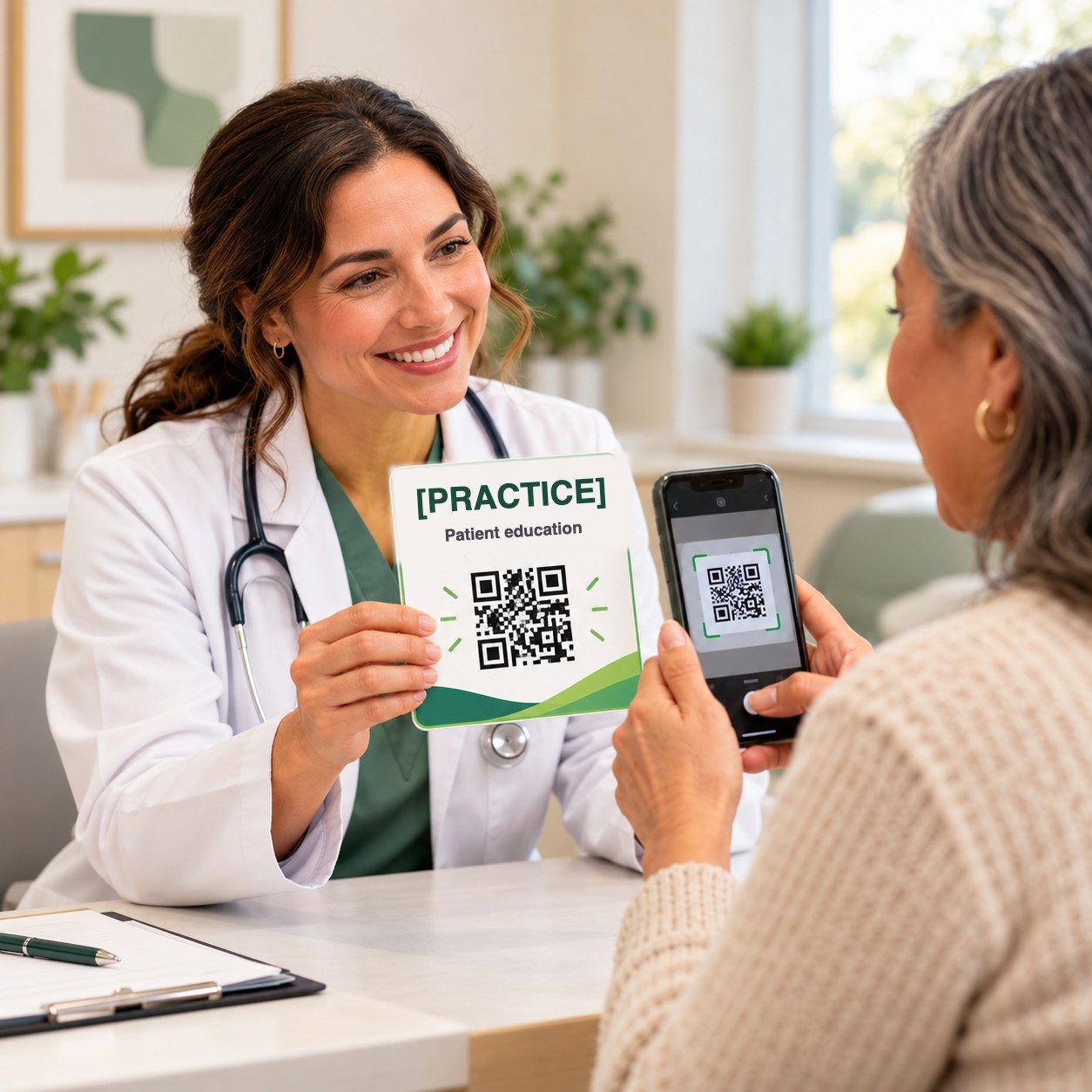
Hand over the card. Co-branded with the practice, featuring the doctor’s name.
Patient scans the QR. Name, phone and email only. No app, no portal, no login.
Patient replies YES. The journey is live before they reach the parking lot. Nothing for staff to chase.
Why it matters: patients stop calling the office with the same questions, and they arrive on procedure day prepared. Fewer day-of cancellations, and the doctor gets the credit.
Drop a photo: staff hand the patient the start card
Start card
Your questions, answered by Dr. Patel and your care team.
Scan the code, confirm your number, and short videos arrive by text as you need them.
Try it now
Drop the QR
Scan to start
Watch the demo
On the patient’s phone
How the journey looks at home
✓ No app✓ No login✓ RCS + SMS
2
At home: the adaptive journey begins

Your doctor’s voice follows the patient home.

That evening, a message from a verified RCS sender delivers the first video, sent on behalf of Dr. Patel. Then one question: what’s on your mind most? From there the patient chooses their own path, and every tap sends only the branch that matches.

Video plays in the thread. Suggested replies, carousels, click-to-call, maps and calendar all work natively. Phones without RCS get the same journey by SMS.


Not an app. Not a portal. Not a website. No login.
How Hoot runs
Hoot runs as a text message thread on RCS (Rich Communication Services), in the messaging app the patient already uses every day.
Specialty
Route, then educate + resolve
The patient picks the worry. Hoot sends only that branch.
Every branch is a swipeable carousel of short videos, and most add an action button. Reply MENU anytime to open any video.
Menu
Gives patients a “menu” from built out journey.
Message 1
The first question
After the start video, one question: what’s on your mind most? Three one tap replies, one per worry.
Tap an option on the phone to open its screen below.
9:41
P
Your Practice Patient Care✓
Verified business
Hi Maria, this is Your Practice Patient Care, on behalf of Dr. Patel and your care team.
Getting Ready for Your Knee Replacement · 1:00
Watch Video
1. Preparing for surgery
2. Recovery and pain
3. Cost and insurance
+
RCS message
Signals
Hoot videos measure watch time and delivers polite nudges accordingly.
One tap replies
No typing. The patient taps a suggested reply and the matching branch is sent.
If they tap 1
Preparing for surgery
Core path
9:41
P
Your Practice Patient Care✓
Verified business
Preparing for surgery
Three short videos from Dr. Patel’s team. Swipe to see all three.
Your Pre-Surgery Checklist · 0:55
Watch Video
Preparing Your Home · 0:50
Watch Video
What Happens on Surgery Day · 1:05
Watch Video
+
RCS message
If they tap 2
Recovery and pain
Library branch
9:41
P
Your Practice Patient Care✓
Verified business
Recovery and pain
Most patients worry about this. Swipe to see both.
Managing Pain After Surgery · 0:55
Watch Video
Your First Weeks of Physical Therapy · 1:00
Watch Video
Talk to a nurse
+
RCS message
If they tap 3
Cost and insurance
Library branch
9:41
P
Your Practice Patient Care✓
Verified business
Cost and insurance
Two short videos on cost and paying for surgery. Swipe to see both.
Your Costs and Insurance · 0:50
Watch Video
Payment Options · 0:45
Watch Video
Check my coverage
+
RCS message
Only the branch they tap is sent
Know why patients don’t book
Every “Not yet” and the concern behind it is captured and reported to your team.
Message 2
The readiness mini-survey
Sent 30 minutes after the patient watches any video in the journey (at least 5% watched).
Tap an option on the phone to open its screen below.
9:41
P
Your Practice Patient Care✓
Verified business
Do you feel ready for surgery?
1. I’m ready
2. Not yet
+
RCS message
If they tap 1
I’m ready → Surgery day
Patient-led
9:41
P
Your Practice Patient Care✓
Verified business
I’m ready
That’s great to hear, Maria. Here’s everything for surgery day in one place.
Your Surgery Day · 0:50
Watch Video
+
RCS message
If they tap 2
Not yet → Concerns before surgery
Hesitation detector
9:41
P
Your Practice Patient Care✓
Verified business
Not yet
Common Concerns Before Surgery · 0:40
Watch Video
1. Preparing for surgery
2. Recovery and pain
3. Cost and insurance
+
RCS message

I’m ready: a confirmation and the procedure day video.

Not yet: a common concerns video, then three replies that route back to the matching branch.

Routes back to the branch that matches the barrier

Preparing for surgery, Recovery and pain, or Cost and insurance each reopens its carousel.

After2 days
IfDid not watch
ThenSend a reminder with the video
Polite nudge
If a video isn’t watched
At any step, Hoot video tracks watch time and sends a friendly reminder with the same video.
9:41
P
Your Practice Patient Care✓
Verified business
Today 8:45 PM
Your Getting Ready Video
Hi Maria, quick reminder: Dr. Patel’s team recorded a short video to help you get ready for surgery. It only takes a minute.
Watch Video
+
RCS message
Once watched
The journey proceeds to the next card.
Practice dashboard
Every tap, view and silence is measured, and each one decides the next message.
SignalWhat Hoot measuresHow Hoot nudges
Watch time
Seconds watched and drop-off point on every video
No video watched after 2 days: a reminder with the same video
Replies
Which button the patient taps at each step
Sends only the branch that matches their answer
Silence
No reply to a question or check-in
A follow-up text, then a care team alert
Readiness
“I’m ready” or “Not yet” before the procedure
Ready: procedure day video. Not yet: back to the concern
Barriers
The concern the patient names at each step
Opens the videos and support for that concern
The setup

How we set everything up.

A
Design the adaptive journey with Hoot

Hoot maps how each reply or silence routes the patient to the next video, from the consult to the day of the procedure.

EnrolledWatched video 1No view in 2 daysI’m readyNot yetReminder nudgeAsks a questionProcedure dayConcern videos
Branches follow your clinical protocols and the procedure the patient is scheduled for.
B
We develop the content

About 12 short patient videos across the journey. Your providers review every script and video. Nothing goes live without your approval.

Two options · tap to watch a sample
Sample real HCP video
Your HCPs on video
Your own providers, recorded once by Hoot
Sample AI HCP Educator video
AI HCP Educator
Fastest to produce and update
Patient video: Getting ready for your knee replacementPatient video: Your pre-surgery checklistPatient video: Preparing your homePatient video: What happens on surgery dayPatient video: Managing pain after surgeryPatient video: Your first weeks of physical therapyPatient video: Your costs and insurancePatient video: Payment optionsPatient video: Your surgery dayPatient video: Common concerns before surgeryPatient video: Meet your surgical team
11 videos in the patient series✓ Approved by your providers
C
Launch in your office

Hoot-in-a-box arrives with everything your front desk needs to enroll patients on day one. Staff are trained before the box lands.

Hoot
In-a-box
1 · The box
One per location, sent to the practice manager.
Questions about your procedure?
Scan to start
2 · Tear-off sheets
QR sheets handed over at the visit.
Exam room
Scheduled for a procedure?
3 · Exam room tents
Patients scan while they wait.
Start here
Your videos, by text
4 · Start cards
Wallet cards to take home.
Hoot
Staff onboarding guide
Enroll a patient in 20 seconds
5 · Staff onboarding
One-page guide plus live training.
The report

What your practice will see, in real time

Every tap is a data point. See each patient’s status, plus totals across every enrolled patient.

MeasureWhat it tells you
01
Prepared
Who is ready for surgery?
Known from the readiness check: the patient tells you whether they feel ready before the date.
02
Cancellation risk
Who might cancel or no-show?
Known from silence: no videos watched, no replies to check-ins, or a “not yet.”
03
Concerns
What holds patients back?
The concern they name, ranked across all patients and by procedure.
04
Watch time
Which videos land?
Seconds watched and drop-off point per video, so you know which content works.
Patient-level status for your team · totals across all enrolled patientsUpdated as patients reply
Results

Patients show up prepared when they learn, understand and trust.

On their time, on their phone, from the person they trust most: their own doctor.

Decreased
No-shows and cancellations
Patients who understand the plan keep the date, and silent patients are flagged before it’s too late.
Increased
Procedures booked
Questions about pain and cost are answered at home, so more consults turn into scheduled cases.
Decreased
Staff phone time
The same questions are answered once, on video, instead of over and over on the phone.
Try it now
Book a demo
Hoot
Bob Miglani · Founder & CEO · bob@hoothealth.com · (609) 436-0778 · hoothealth.com
Built for
specialty practices
The practice name, Dr. Patel, the patient and all phone numbers are placeholders for demonstration. In a live program all content is reviewed and approved by your clinical team before it goes live.
Try it now
Book a demo